
How to Manage SaaS Subscriptions Using Virtual Cards (The Stress-Free Guide)
Learn how virtual cards for SaaS subscriptions help finance teams stop surprise renewals, control vendor spend, and simplify SaaS subscription management with one card per vendor.

Sai Sabiksha
Founder
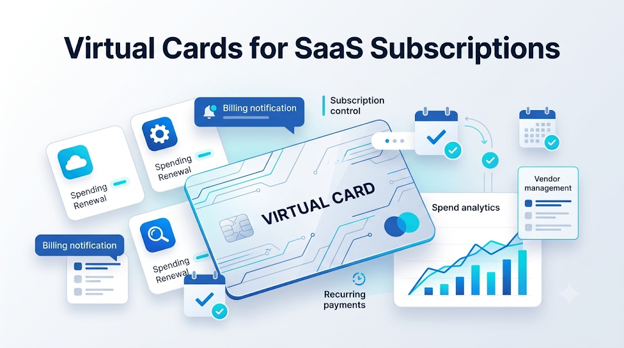
If your finance team is still chasing receipts for forgotten software trials, duplicate subscriptions, and surprise renewals, you do not just have a software stack problem. You have a SaaS spend control problem.
This is exactly where virtual cards for SaaS subscriptions become useful. Instead of putting every tool on one shared corporate card, you issue a dedicated virtual card to each vendor, set strict limits, and shut off billing with one click when needed. It is a simple change, but it can dramatically reduce wasted spend, renewal surprises, and the operational mess that comes with SaaS sprawl.
For finance managers, CFOs, operations leads, and startup founders, the appeal is straightforward: more visibility, tighter controls, faster cancellation, and cleaner accounting. If you are looking for a practical way to control software costs without slowing down the business, virtual cards are one of the most effective tools available.
In this guide, we will break down how virtual subscription cards work, why traditional corporate cards fail for SaaS budgeting, and how to use the one card per vendor virtual card model to regain control over your software stack.
The Hidden Cost of SaaS Sprawl
SaaS spending rarely becomes a problem all at once. It builds quietly over time. A team signs up for a trial. Another department buys a duplicate tool. A founder uses a personal card to pay for a design app during an urgent launch. A cloud tool auto-renews at a higher plan without anyone noticing. By the time finance reviews the monthly statement, the software budget has become fragmented and difficult to explain.
This is the real cost of SaaS sprawl. It is not just about paying for too many tools. It is about losing control over who bought what, why it is still active, and whether the business is getting value from it.
The Trial Trap, Surprise Renewals, and Zombie Accounts
Most SaaS waste falls into three categories:
- Trial-to-paid traps — A team starts a 14-day trial and forgets to cancel it. The card on file converts automatically, and suddenly a tool nobody uses becomes a recurring annual charge.
- Unannounced price hikes — Some vendors increase pricing at renewal or after usage thresholds are crossed. If the card on file remains active with no spend controls, the higher amount gets billed automatically.
- Zombie subscriptions — These are tools still being paid for after the original owner has left the company, changed roles, or stopped using the product. Because billing continues silently, zombie accounts can stay alive for months.
The problem is not only wasted money. It is also wasted finance time. Teams spend hours tracing card charges, emailing budget owners, checking invoices, and trying to understand which subscriptions are still needed.
If you are wondering how to manage SaaS spend without building a manual process around every renewal, virtual cards offer a much cleaner system.
What Is a Virtual Subscription Card?
A virtual subscription card is a digitally generated card number created for online payments. It works like a payment card, but it exists only in software rather than as physical plastic.
For SaaS spending, the most useful version is a card that is tied to your company’s central wallet or business account, assigned to one specific software vendor, restricted with spend limits or merchant controls, and easy to freeze, replace, or deactivate instantly.
Think of it as a payment container built for one subscription.
Instead of putting Slack, Notion, AWS, HubSpot, and Figma on the same business card, you issue a separate virtual card for each vendor. Each card can have its own budget cap, renewal owner, and accounting tag.
A good virtual card platform will typically let you:
- Create cards instantly from a dashboard
- Lock each card to a single merchant
- Set monthly, quarterly, or annual spending caps
- Monitor charges in real time
- Export transaction data into accounting systems
- Freeze or cancel a card without affecting other subscriptions
That structure is why business virtual credit card platforms are increasingly being used as part of modern SaaS spend governance.
Why Traditional Corporate Cards Fail SaaS Budgeting
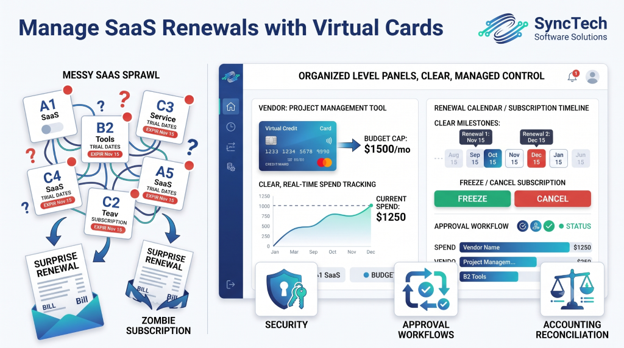
Why Traditional Corporate Cards Fail SaaS Budgeting
Traditional corporate cards were not designed to manage dozens of recurring software subscriptions across multiple teams. They are too broad, too shared, and too hard to control at the vendor level.
When ten or twenty SaaS tools sit on one card, a single cancellation issue can create a chain reaction. If you need to stop one vendor urgently, you may end up replacing the whole card and re-entering payment details across every active service linked to it.
That is exactly the “break the chain” problem finance teams want to avoid.
| Feature / Capability | Traditional Corporate Cards | Virtual Subscription Cards |
|---|---|---|
| Issuance Speed | Days to weeks for physical card setup | Instant card creation online, often in under 60 seconds |
| Spend Controls | Shared account-wide limit | Per-card, per-vendor spending caps |
| Security Risk | One leaked card can affect multiple vendors | A compromised card impacts only one tool |
| Cancellation | Replace card and update many vendors | Freeze or delete one card instantly |
| Visibility | Mixed charges across departments and tools | Clear vendor-level tracking |
| Accounting Reconciliation | Manual receipt chasing and mapping | Easier categorization and ERP sync support |
| Vendor Ownership | Often unclear on statements | Each card can be mapped to a specific team or owner |
| Renewal Management | Hard to isolate renewals | Each recurring charge is contained to one card |
For software-heavy companies, the difference is operationally significant. A virtual card model turns a messy subscription environment into a controlled payment system.
The 4-Step Framework: Putting Your SaaS on Autopilot
The easiest way to use virtual cards for SaaS subscriptions is to standardize them around a repeatable operating model. The most effective framework is simple: one card, one vendor, one owner, one budget.
Here is how to put it into practice.
Step 1: Assign One Card per Vendor
The first rule is the most important. Every software vendor should get its own dedicated virtual card.
Do not place multiple subscriptions on one card if you can avoid it. The whole advantage of virtual cards comes from isolation. When every tool has a separate card, you gain clean visibility into who owns it, what it costs, and whether it should still exist.
A good card naming structure might look like this:
- Notion – Marketing – Monthly
- AWS Sandbox – Engineering – Usage Cap
- Figma – Design – Annual Renewal
- HubSpot – Sales Ops – Quarterly Review
This is where the one card per vendor virtual card model becomes powerful. It makes every subscription identifiable at a glance and removes ambiguity during budget reviews.
It also reduces operational risk. If one vendor has billing issues, a failed cancellation, or a suspected card compromise, you can deal with that one subscription without touching the rest of your stack.
Step 2: Set Strict Monthly Caps
Once each vendor has its own card, set a hard spending ceiling.
This is the control that prevents billing surprises from turning into budget damage. If a vendor is expected to bill $49 per month, you might cap that card at $60. If a cloud testing environment should never exceed $200, cap it at $200.
This is especially useful for usage-based tools.
For example, imagine your engineering team is testing an AWS sandbox environment. A misconfigured server or runaway workload could generate a much larger bill than expected. If the virtual card attached to that sandbox is capped at $200, you have a financial guardrail in place. Instead of waking up to a $4,000 surprise bill, the charge fails once it reaches the threshold.
That kind of protection is difficult to replicate with a shared corporate card.
Step 3: Enforce Hard Merchant Locks
A spend limit alone is good. A spend limit plus a merchant lock is better.
Merchant locking means a virtual card can only be charged by the approved vendor it was created for. A Notion card works only with Notion. An Adobe card works only with Adobe.
This matters because it stops accidental misuse and reduces fraud exposure. If card details are copied, forwarded, or compromised, the card cannot be used broadly across other merchants.
For finance teams, merchant locks also create better policy discipline. Employees are less likely to reuse an existing company card for an unrelated tool when the card is technically restricted to one vendor.
In a world of growing SaaS sprawl, these controls turn payment operations into a governed process rather than a trust-based one.
Step 4: Deactivate Instantly to Cancel
This is one of the most practical benefits of virtual cards.
When you want to stop a subscription, you do not need to cancel an entire corporate card, call the bank, or update payment details across twenty other tools. You simply freeze or deactivate the single virtual card assigned to that vendor.
That gives finance teams leverage in three common situations:
- A trial should not convert to paid
- A tool is no longer approved or needed
- A vendor makes cancellation unnecessarily difficult
It does not replace proper contract management, but it does give you a fast way to stop future billing attempts while you resolve the cancellation process.
This alone can save hours of administrative work each month.
How Virtual Cards Fit Into SaaS Subscription Management Software
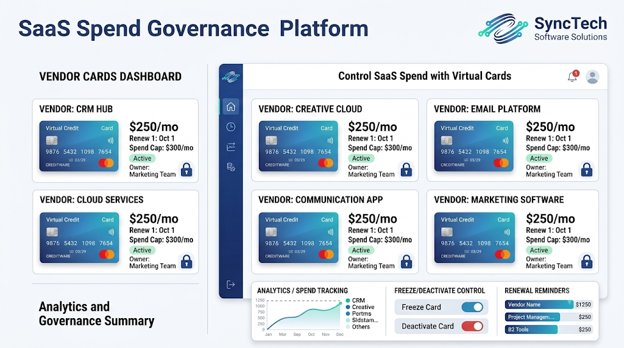
How Virtual Cards Fit Into SaaS Subscription Management Software
Virtual cards are not a replacement for full SaaS subscription management software. They are better viewed as a control layer inside a broader spend management system.
Subscription management platforms help companies discover tools, track renewals, monitor usage, and identify overlap. Virtual card platforms solve a different but related problem: they control how those tools get paid.
Used together, they create a stronger operating model.
A finance team might use SaaS management software to answer questions like:
- Which subscriptions renew in the next 60 days?
- Which departments own the most tools?
- Where do we have duplicate software across teams?
- Which licenses are inactive?
At the same time, virtual cards answer questions like:
- Which card is paying for this tool?
- What is the approved monthly cap?
- Can we stop this renewal immediately?
- Who owns the card and budget for this vendor?
The combination is powerful because discovery without payment control still leaves risk. Payment control without visibility leaves blind spots. Together, they create a cleaner SaaS governance system.
Key Benefits of Virtual Cards for SaaS Subscriptions
- Cleaner vendor-level visibility
- Lower risk of accidental overspend
- Faster cancellation and offboarding
- Better control over employee purchases
- Easier accounting reconciliation
- Reduced fraud and card compromise exposure
Each card maps to one tool, making it easier to understand your software stack and explain spend during monthly reviews. Card-level limits create automatic budget guardrails, charges cannot silently grow beyond approved thresholds, and unused tools can be shut off at the card level without disrupting the rest of the stack.
When a Free Virtual Card for Business Makes Sense
Not every company needs an enterprise spend platform on day one. Early-stage startups and smaller teams may start by looking for a free virtual card for business or a low-cost plan that includes basic card issuance and spend controls.
That can make sense if your needs are still simple.
- Separate software vendors onto individual cards
- Stop trial-to-paid surprises
- Give founders and ops teams better visibility
- Keep monthly software spend under control
But as the number of subscriptions grows, free tools often become limiting. Finance teams usually need more than basic card creation. They need approval workflows, accounting integrations, policy controls, audit trails, and support for multiple budget owners.
So the right question is not just “Can I get a free virtual card?” It is “Will this tool still work when our SaaS stack doubles?”
Top Virtual Business Card Providers to Consider
The market for virtual cards is broad, and not every provider is built for the same type of business. Some are strong for international payments. Others are better for startup expense control, engineering-led companies, or multi-entity finance operations.
Wise Business
Often attractive for companies paying international SaaS vendors or handling multi-currency software expenses. If your stack includes global tools billed in different currencies, FX efficiency can matter.
Revolut Business
Useful for companies that want team spend controls, multiple card issuance options, and broad business banking features alongside virtual cards.
Brex
Popular with venture-backed startups and technology companies that want spend management, card controls, approvals, and broader finance workflows in one system.
Stripe Issuing / fintech infrastructure options
Relevant for larger or more technical companies that want embedded or highly customizable card infrastructure, especially if finance tooling is being built into internal workflows.
Other spend management and fintech platforms
Many platforms now offer virtual cards as part of a wider spend management suite. The best choice depends on your accounting stack, geography, approval needs, and whether you want cards only or a full finance operations layer.
When comparing providers, look beyond the marketing headline and evaluate these capabilities:
- Ability to issue unlimited or high-volume virtual cards
- Merchant locking for subscription payments
- Card-level recurring spend limits
- Instant freeze and cancellation controls
- Approval workflows for new software purchases
- Accounting integrations with Xero, NetSuite, QuickBooks, or ERP systems
- Audit trails and role-based access
- Support for global vendors and multi-currency billing
- API access if you want to automate provisioning
The best business virtual credit card solution is the one that fits your finance operating model, not just the one with the prettiest dashboard.
How to Roll Out Virtual Cards Without Slowing Teams Down
One concern finance leaders sometimes have is that tighter spend control will create friction for employees. That only happens if the rollout is handled as a restriction rather than a system.
A smoother rollout usually follows this process:
- Audit current SaaS subscriptions
- Group subscriptions by owner and criticality
- Create a new card policy
- Re-issue cards during the next billing cycle
- Tag cards for accounting from day one
- Review inactive or low-usage tools quarterly
The goal is not to block software purchases. The goal is to make every software purchase visible, accountable, and easy to stop.
Common Mistakes to Avoid
- Using one virtual card for multiple vendors
- Setting limits too high “just in case”
- Failing to assign an owner to each card
- Ignoring annual renewals
- Treating virtual cards as the whole SaaS strategy
Virtual cards solve payment control. They work best when paired with procurement discipline, renewal reviews, and subscription management processes.
Summary: Reclaim Your Finance Team’s Time
SaaS sprawl is not just a budgeting problem. It is a visibility, control, and workflow problem. Shared corporate cards make it too easy for subscriptions to multiply, renew quietly, and become difficult to unwind.
That is why virtual cards for SaaS subscriptions are becoming a standard finance control for modern software-heavy businesses.
- Isolate every vendor with a dedicated card
- Cap spend before surprise bills happen
- Lock cards to approved merchants
- Cancel faster without replacing a shared corporate card
- Simplify reconciliation across finance and accounting systems
For companies asking how to manage SaaS spend without adding more manual admin, the answer is often not another spreadsheet. It is a better payment structure.
Start with the principle that matters most: one card per vendor. Once every subscription has its own owner, budget, and card-level control, SaaS management becomes far easier to govern.
That is how finance teams stop chasing software chaos and start running a cleaner, more predictable software budget.
Ready to translate these insights into real operational efficiency?
Let's design and build your custom web applications, SaaS dashboards, or CRM integrations. Reach out to our solutions architect desk for a free feasibility review.
Frequently Asked Questions
Yes. Virtual cards are especially useful for recurring SaaS payments because they allow vendor-level limits, easier cancellation, and better visibility than a shared corporate card.
Yes. In fact, this is one of the best use cases. You can create a card specifically for the trial, set a low cap, and deactivate it before the trial converts if the tool is not approved.
A business virtual credit card is the broader category. A virtual subscription card is a virtual card specifically used to manage recurring software or vendor payments.
No. Virtual cards handle payment control. SaaS subscription management software handles discovery, renewal tracking, and usage visibility. The best finance teams often use both together.
It can be enough for very small teams with a limited SaaS stack. But as the number of subscriptions grows, finance teams often need stronger controls, accounting integrations, and approval workflows.